Sep 18, 2026
We’ve just released a new version of Connect Plus Server with the following fixes and improvements:
Fixed a login issue caused by small differences in your computer’s clock.
Fixed an issue that caused the application to stop working properly after a while when using a non-Nordomatic account.
Improved overall stability and performance.
You can get the latest version here: https://downloads.ibostechnologies.com/connect%2B_server/Connect-plus-server-0.1.9.exe
Sep 9, 2026
This release improves application stability. We strongly recommend upgrading to the latest version as soon as possible.
You can download it here: https://downloads.ibostechnologies.com/connect%2B_server/Connect-plus-server-0.1.8.exe
Sep 2, 2026
Fixed an issue where the application could become unavailable around midnight.
You can download the new version here: https://downloads.ibostechnologies.com/connect%2B_server/Connect-plus-server-0.1.7.exe
Sep 2, 2026
This release fixes an issue where users with access to a very large number of tunnels could see none of them in the interface.
You can download the new version here: https://downloads.ibostechnologies.com/connect%2B_client/Connect-plus-client-0.1.7.exe
Aug 27, 2026
We released a new version of Connect+ Client containing the following improvements:
Fixed WireGuard tunnels not connecting properly in multimode.
Switching between WireGuard single mode and multimode should now work more consistently.
You can download the new version here: https://downloads.ibostechnologies.com/connect%2B_client/Connect-plus-client-0.1.6.exe
Aug 27, 2026
We released a new version of Connect+ Server containing the following improvements:
Fixed WireGuard tunnels not connecting properly in multimode.
Switching between WireGuard single mode and multimode should now work more consistently.
You can download the new version here: https://downloads.ibostechnologies.com/connect%2B_server/Connect-plus-server-0.1.6.exe
Aug 14, 2026
This version of Connect+ Server fixes an issue with WireGuard tunnels in Multi Mode where a suggested IP address may not be provided, or the tunnel may fail to connect entirely.
You can download the latest version here: https://downloads.ibostechnologies.com/connect%2B_server/Connect-plus-server-0.1.5.exe
Aug 12, 2026
We have released a new version of Connect+ Server.
This release fixes the following issues:
Connections not automatically coming back online after a machine reboot.
The application failing to start or function correctly because it attempted to use port 8080 exclusively.
We strongly recommend upgrading to this version as soon as possible and discontinuing the use of any earlier versions.
You can download the latest version here:
https://downloads.ibostechnologies.com/connect%2B_server/Connect-plus-server-0.1.4.exe
Aug 12, 2026
We’ve released a new version of the Connect+ Client.
This release fixes an issue with the dark theme that made parts of the filtering interface difficult to see.
You can download the latest version here:
https://downloads.ibostechnologies.com/connect%2B_client/Connect-plus-client-0.1.4.exe
Jul 6, 2026
We are ready to share a first version of Connect+ Server with you. This application will replace CTC server in the end.
You can download it here: https://downloads.ibostechnologies.com/connect%2B_server/Connect-plus-server.exe
There are a few things you need to be aware of before you start testing:
Important: If you intend to run Connect+ alongside CTC, please make sure you read the updated documentation first. You may want to copy your configuration file before installing Connect+, as running Connect+ for the first time will move the configuration from CTC to Connect+.
Please read the updated documentation here:
https://ibosdocs.nordomatic.com/ibos-connect/external-tools/connect+-beta
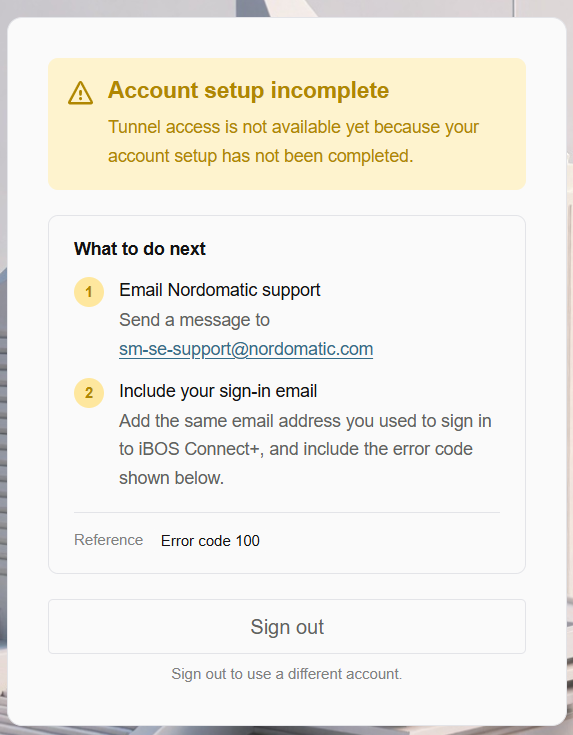
By default, your account will not have access to Connect+ Server. In the future, access will be managed through the order form. However, during the beta period, you can request access by sending the email address of the account you want to use to [email protected]. We will then make sure access is granted as soon as possible.
Before requesting access, please make sure that this email address is already connected to a Connect account.
We recommend not using your personal Connect account for Connect+ Server. Instead, create a new account using a different email address. If your account ever gets blocked, every connection you have set up with that account will stop working.
We previously released the Client version of Connect+. Please see the documentation to understand the difference between the Client and Server versions.
When you install the product, you will see a blue Windows warning screen. Click More info and then Run anyway to continue. We are working on a solution for this.
Please share any positive, negative, or general feedback with us. We will also keep you informed about further developments.